
How to Find B2B Leads with Instantly.ai: A Step-by-Step Guide
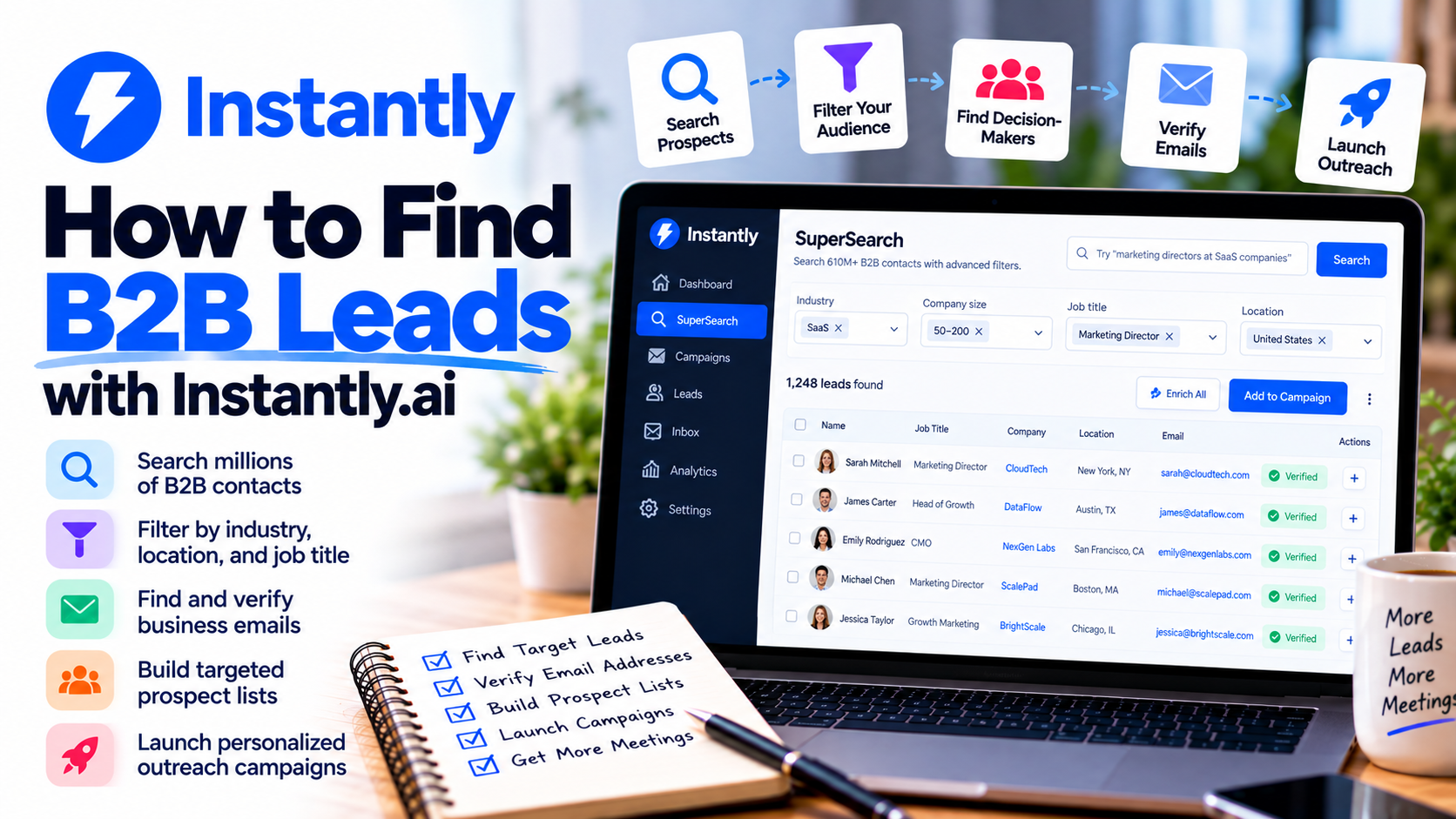
Finding qualified B2B leads is one of the biggest challenges businesses face when trying to grow their customer base.
You might have an excellent product, a competitive service, and a compelling sales pitch. But none of that matters if you're contacting the wrong people.
Traditionally, B2B prospecting involves researching companies, searching for decision-makers, finding business email addresses, and organizing everything into spreadsheets.
That process can take hours.
Fortunately, platforms like Instantly.ai are making B2B lead generation more manageable.
With its built-in prospecting database, advanced search filters, email enrichment, and automated outreach tools, Instantly.ai helps businesses find relevant prospects and turn those contacts into potential sales opportunities.
In this guide, I'll walk you through how to find B2B leads using Instantly.ai, from identifying your ideal customers to launching personalized outreach campaigns.
What Is B2B Lead Generation?
B2B lead generation is the process of identifying businesses and professionals who might benefit from your products or services.
Unlike B2C marketing, where you're usually targeting individual consumers, B2B prospecting focuses on companies and the people responsible for purchasing decisions.
For example, imagine you operate an IT consulting business.
Your ideal customers might include companies with 20–200 employees that need help managing Microsoft 365, cybersecurity, or cloud infrastructure.
Instead of contacting random businesses, you would look for IT managers, operations directors, or business owners who might have a genuine need for your services.
The goal isn't simply to collect email addresses.
It's to identify the right companies, find the appropriate decision-makers, and start relevant conversations.
What Is Instantly.ai SuperSearch?
One of the platform's most useful prospecting features is SuperSearch.
SuperSearch is the lead discovery and enrichment system inside Instantly.ai. It replaces the platform's older Lead Finder experience.
According to the company's documentation, SuperSearch provides access to a database of more than 610 million B2B contacts.
You can search for prospects using filters such as job title, industry, company size, location, revenue, and technology stack.
It also includes AI-assisted search, work email enrichment, and additional business information to help you evaluate potential customers.
Instead of searching for leads in one application and transferring them to another platform for outreach, you can manage much of the process in one place.
Let's look at how to use it.
Step 1: Define Your Ideal Customer Profile
Before searching for leads, you need to understand who you're trying to reach.
This is called your Ideal Customer Profile, or ICP.
Your ICP describes the types of companies most likely to benefit from your offer.
For example, if you're selling outsourced IT support, your ideal customer might look like this:
Industry: Professional services.
Company size: 20–100 employees.
Location: United States or Canada.
Decision-maker: IT Manager, Operations Director, or Business Owner.
Potential need: Managing technology without a large internal IT department.
The more specific your ICP, the easier it becomes to find relevant prospects.
I recommend starting with one clearly defined audience rather than trying to reach every possible business.
Step 2: Open SuperSearch in Instantly.ai
Once you've created an account, navigate to the platform's lead discovery tools and open SuperSearch.
You'll find options to search for contacts and companies using manual filters or AI-assisted search.
For beginners, AI Search can be particularly convenient.
Instead of configuring every filter individually, you can describe your ideal prospect in plain English.
For example:
"Find operations directors at accounting firms in Toronto with 20–100 employees."
SuperSearch can use that description to help build a relevant search.
Alternatively, you can manually adjust filters for greater control.
This is especially useful when you already know exactly which industries, roles, and company characteristics you want to target.
Step 3: Filter Companies by Industry and Size
One of the biggest mistakes in B2B prospecting is targeting businesses that aren't a good fit.
For example, a company offering enterprise cybersecurity consulting might not benefit from contacting very small businesses with only two employees.
With Instantly.ai, you can narrow your search using company characteristics.
These include industry, employee count, estimated revenue, and location.
Imagine you're selling HR software designed for growing companies.
You might target businesses with 50–250 employees in industries where hiring and employee management are important.
These filters help you build a more relevant prospect list.
The objective is quality, not simply the largest number of contacts.
Step 4: Find the Right Decision-Makers
Finding the right company is only half the challenge.
You also need to contact someone who has influence over the purchasing decision.
SuperSearch allows you to filter prospects by job title, department, and management level.
For example:
Your product or servicePotential decision-makersIT consultingIT Manager, Director of ITMarketing servicesMarketing Director, CMOHR softwareHR Manager, People Operations DirectorAccounting servicesCFO, Finance DirectorSales softwareVP of Sales, Sales Operations Manager
Job titles vary between organizations, so consider including several relevant variations.
For smaller businesses, the owner or founder might be the appropriate contact.
For larger organizations, a department director may be more relevant.
The better your targeting, the easier it becomes to write a message that addresses the recipient's responsibilities.
Step 5: Use Buying Signals to Identify Opportunities
Not every company is ready to purchase your solution.
Some businesses may be expanding, hiring, adopting new technology, or experiencing changes that create new requirements.
SuperSearch offers additional filters and enrichment options involving company activity and business signals.
These can include recent funding, hiring activity, technology usage, company news, and other relevant developments.
For example, imagine you offer recruitment services.
A company actively hiring for several positions might be more relevant than one with no visible recruitment activity.
Similarly, an IT consulting business might identify growing companies that could require additional technical support.
These signals don't prove that a company intends to buy, but they can help you prioritize prospects and create more timely outreach.
Step 6: Find and Enrich Business Email Addresses
After identifying suitable prospects, the next step is obtaining accurate contact information.
Instantly.ai uses a process called waterfall email enrichment.
Instead of relying on a single data provider, the platform checks multiple sources to find work email addresses.
If one provider doesn't return a verified result, another provider may be checked.
This can improve the likelihood of finding usable contact information.
You can also enrich profiles with additional details, such as company descriptions, job information, technology usage, and business activity.
These details are useful for both qualification and personalization.
SuperSearch operates using data credits, so email discovery and additional enrichment actions may consume credits depending on the results and services used.
Keep in mind that even verified email addresses can become outdated, and verification doesn't guarantee delivery.
Step 7: Organize Your Leads into Targeted Lists
Once you've identified relevant contacts, avoid putting everyone into one enormous outreach campaign.
Instead, organize prospects into smaller groups based on shared characteristics.
For example, a marketing agency might create separate audiences for:
SaaS companies.
Accounting firms.
Real estate businesses.
Ecommerce brands.
Each audience has different challenges.
A SaaS company might be interested in customer acquisition, while an accounting firm might care more about generating consultation appointments.
Instantly.ai allows you to save searches and move selected leads into outreach campaigns.
You can also use features such as excluding previously acquired leads to reduce duplicate prospecting.
Organizing contacts properly makes your campaigns easier to manage and personalize.
Step 8: Personalize Your Outreach with AI
Finding qualified leads is important, but your message still needs to capture their attention.
Generic sales pitches rarely create meaningful conversations.
This is where the platform's AI-assisted enrichment and writing features can help.
Instantly.ai provides options to research prospects and generate personalized opening lines or email content using available company information.
For example, instead of writing:
"We provide IT support services. Are you interested?"
You might write:
"Hi Sarah, I noticed your company has been expanding its Toronto operations. I work with growing professional services firms that need additional Microsoft 365 and IT support without hiring a full internal team."
The second message is more relevant because it connects your offer to a specific business situation.
However, always review AI-generated content.
Incorrect assumptions or fabricated personalization can damage credibility.
Step 9: Add Your Leads to an Email Campaign
Once your prospect list is ready, you can add selected contacts directly to an outreach campaign.
Instantly.ai includes tools for creating automated cold email sequences.
For example, a simple campaign might include:
Day 1: Send a personalized introduction.
Day 4: Follow up with a useful insight.
Day 8: Share a relevant case study or example.
Day 13: Send a final, respectful follow-up.
These timings are only examples. Adjust them based on your audience, engagement, and applicable outreach rules.
You can also test different email versions to determine which messaging resonates with your prospects.
Remember to configure email authentication, maintain healthy sending practices, and avoid sudden increases in sending volume.
Step 10: Track Results and Improve Your Targeting
Finding leads isn't a one-time activity.
The most effective prospecting strategies improve through testing and feedback.
Instantly.ai provides campaign analytics that can help you evaluate outreach performance.
Pay particular attention to positive replies, qualified conversations, and booked meetings.
For example, imagine you contact two groups:
100 marketing directors at SaaS companies.
100 marketing directors at retail businesses.
If the SaaS audience produces more qualified conversations, that may indicate a stronger fit for your offer.
You can then refine your targeting and messaging accordingly.
Over time, this helps you develop a more repeatable lead generation process.
Common B2B Lead Generation Mistakes to Avoid
Even with powerful prospecting tools, businesses can make mistakes that reduce campaign effectiveness.
One common mistake is prioritizing quantity over relevance.
Another is assuming that a verified email address means someone is interested in your services.
You should also avoid sending identical messages to every prospect, using unverified claims, or repeatedly contacting people who haven't shown interest.
And remember that access to a business email address doesn't automatically give you permission to send marketing messages.
Follow applicable privacy and anti-spam laws, including Canada's CASL where relevant, and respect opt-out requests.
Good targeting, appropriate consent, accurate data, and useful messaging matter more than automation alone.
Who Should Use Instantly.ai for B2B Lead Generation?
I think the platform is especially relevant for businesses that rely on outbound prospecting.
Marketing agencies can identify companies that may need advertising, SEO, or lead generation services.
Consultants can research decision-makers at businesses that fit their expertise.
SaaS companies can identify potential customers based on industry, company size, and technology requirements.
Freelancers can build targeted lists of businesses that might need their services.
B2B sales teams can combine prospect research, email enrichment, and automated outreach within a more connected workflow.
However, businesses that depend entirely on inbound leads or rarely conduct outbound sales may not need all of these capabilities.
Final Thoughts: Is Instantly.ai Worth Using to Find B2B Leads?
Finding qualified B2B leads doesn't have to mean spending hours researching companies and manually collecting contact information.
With Instantly.ai, businesses can use SuperSearch to identify relevant prospects, filter companies, find decision-makers, enrich contact information, and prepare personalized outreach campaigns.
For me, one of its biggest advantages is connecting lead discovery directly with email outreach.
Instead of constantly transferring data between spreadsheets and different platforms, you can manage more of the process in one place.
Of course, no software can guarantee qualified leads, replies, or sales.
Your results still depend on your offer, targeting, messaging, and follow-up strategy.
But if you're looking for a more organized approach to outbound B2B prospecting, the platform is worth exploring.
The goal isn't to contact thousands of random businesses. It's to identify the right prospects and start conversations that can lead to real business opportunities.
If you're ready to build your first targeted prospect list, explore Instantly.ai and discover how its lead generation and outreach tools can support your sales process.
If you need help setting up Instantly.ai, get in touch with me.