
HubSpot VoIP Software: Make Business Calls Directly From Your CRM
Phone calls are still an important part of many sales and customer service processes.
The problem is that traditional business calling often creates a disconnect.
A sales representative makes a call from one system. Customer information lives somewhere else. Notes have to be entered manually. Managers can't easily see what happened during the conversation. And when another employee speaks with that customer later, they may have very little context.
That's where HubSpot VoIP software becomes interesting.
Instead of treating your phone system and CRM as separate tools, calling becomes part of the customer record itself.
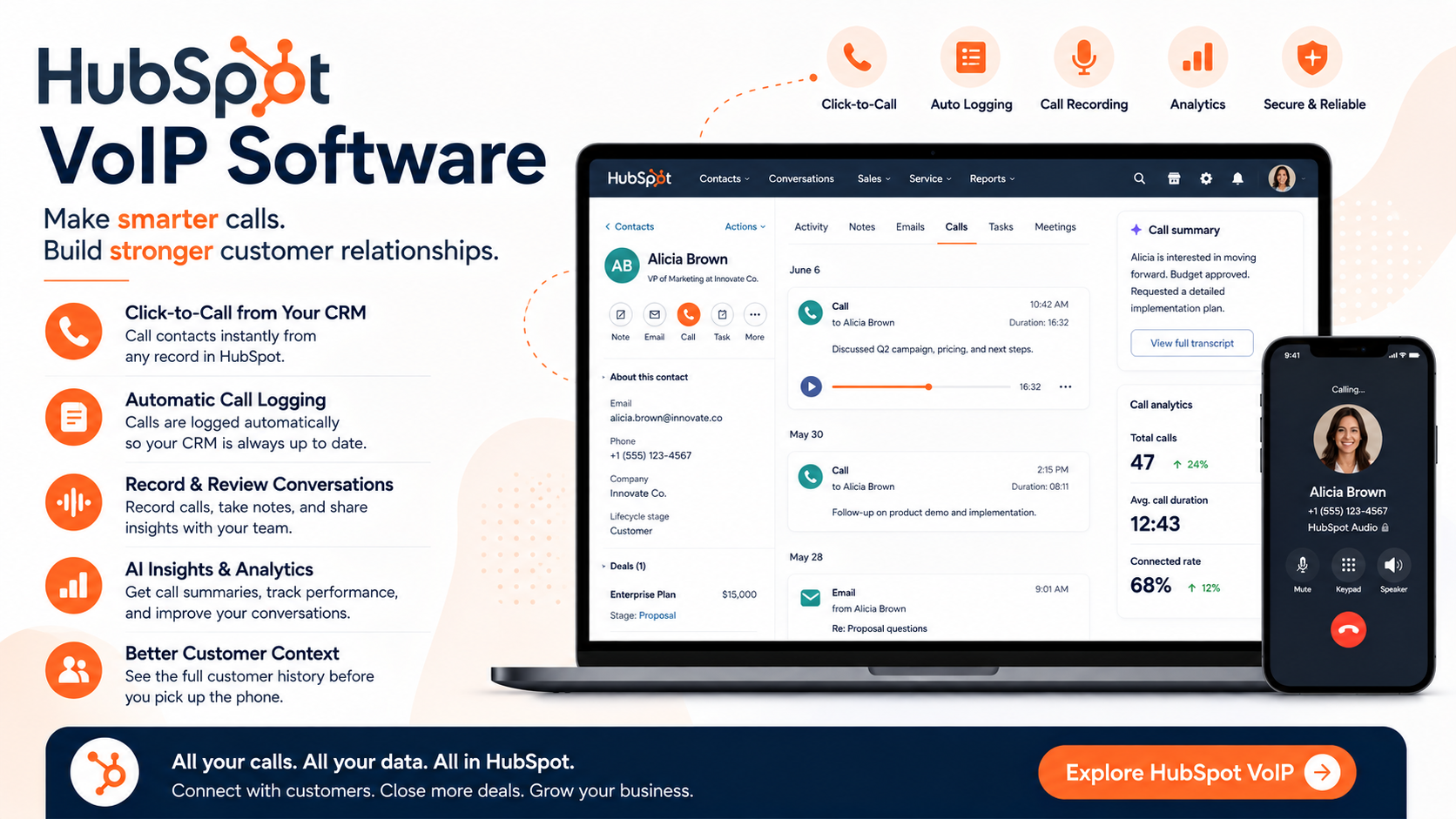
You can make calls from inside the CRM, automatically log activity, record conversations where appropriate, review call information, and keep customer interactions connected to the rest of your sales or service process.
For businesses already considering a CRM—or those trying to consolidate their sales technology stack—here's what you should know.
What Is VoIP Software?
VoIP stands for Voice over Internet Protocol.
In simple terms, it allows you to make phone calls using an internet connection instead of relying entirely on a traditional telephone service.
For businesses, this can create a much more flexible calling environment.
Employees aren't necessarily tied to a physical desk phone, and calling software can connect conversations with other business applications.
That's where HubSpot takes the concept a step further.
Calling isn't simply another communications application sitting beside your CRM.
It's integrated with the customer platform.
Make Calls Directly From HubSpot
One of the biggest benefits is straightforward:
Your team can make calls without constantly switching between systems.
Depending on your setup, calls can be initiated from the Contacts page, an individual contact record, the calling remote, or the conversations inbox. Users can call through their browser, phone, or the mobile app.
Think about what that means for a salesperson.
Instead of:
Open CRM → Find customer → Copy number → Open phone software → Dial → Finish call → Return to CRM → Enter notes
the workflow becomes much more connected.
The salesperson is already looking at the customer's CRM record when the conversation begins.
That's a small operational improvement that can save a surprising amount of time across hundreds or thousands of calls.
Automatically Log Calls to CRM Records
This might be the feature I appreciate most about HubSpot VoIP software.
CRM data is only valuable when employees actually record what happened.
And let's face it: manual data entry is one of the easiest things to forget.
You finish a call.
Another call comes in.
You answer an email.
You join a meeting.
Thirty minutes later, you realize you never updated the CRM.
With the native calling functionality, calls can be automatically logged to the relevant contact record. Recorded conversations can also be associated with CRM records, giving other team members more context around the relationship.
Instead of the CRM merely telling you:
"We spoke with this customer."
you can build a much richer history of the relationship.
Record Customer Conversations
Depending on your subscription, configuration, location, and applicable legal requirements, businesses can also use call recording functionality.
This can be valuable for several reasons.
Managers can review calls.
Sales representatives can revisit important conversations.
Customer service teams can understand previous interactions.
New employees can learn from experienced representatives.
And instead of relying entirely on handwritten notes, teams can retain much more context around important conversations.
HubSpot also provides settings for call recording, transcription and analysis, including options around recording consent messages.
Of course, businesses should always ensure their recording practices comply with the laws and consent requirements that apply to them.
Give Your Sales Team More Context
Imagine you're about to call a prospect.
Would you rather see only their phone number?
Or would you rather see:
Their company
Previous emails
Past calls
Meetings
Notes
Deal information
Recent activities
Marketing interactions
That's the real advantage of connecting calling to a CRM.
Your representative isn't making a call in isolation.
They're making the call with the customer relationship sitting directly in front of them.
With HubSpot, calling activity becomes part of the same customer environment used by sales, marketing, and service teams.
That can create much better continuity between interactions.
Receive Calls Too
VoIP isn't only useful for outbound calls.
HubSpot also supports inbound calling with eligible subscriptions and properly configured numbers.
Inbound calls can ring in the browser, and answered calls are saved to the call index so representatives can take notes during the conversation and review the interaction afterward.
That makes the functionality particularly interesting for customer service teams.
Instead of forwarding everything to personal cell phones or operating a completely separate phone system, eligible teams can handle more of the calling workflow directly from the customer platform.
Use a HubSpot Number or Your Existing Setup
Businesses don't necessarily have to approach calling in exactly the same way.
HubSpot currently supports several approaches.
You can obtain a provided phone number, register an existing outbound number so your caller ID appears when making calls, or integrate a supported third-party calling provider.
That flexibility matters because some organizations need straightforward native calling while others already have significant investments in telecommunications platforms.
The platform also integrates with third-party VoIP providers, including options such as Aircall, RingCentral, and CallRail.
So adopting the CRM doesn't necessarily mean abandoning your entire existing calling infrastructure.
Calling Analytics and Reporting
Calling shouldn't be a black box.
Managers need to understand what's happening.
How many calls are being made?
Which representatives are having conversations?
What's happening after those calls?
Are calling activities contributing to pipeline?
The calling and call-tracking functionality inside HubSpot includes analytics and reporting capabilities designed to help teams evaluate performance.
That becomes even more useful when calling information sits alongside your CRM data.
Instead of evaluating calls as an isolated activity, you can begin thinking about them as part of the broader customer journey.
AI Makes Calling More Interesting
The future of business calling isn't simply clicking a phone icon inside a CRM.
It's extracting useful information from conversations without requiring employees to manually document everything.
The current call-tracking offering includes functionality such as real-time transcription, AI-assisted notes, AI-generated call summaries, tracked keywords and call analytics, with availability depending on your plan and configuration.
This is where I think calling software becomes considerably more valuable.
The conversation itself becomes usable data.
Instead of a manager needing to listen to every 30-minute conversation, AI-assisted tools can make it easier to identify important themes and review what happened.
How Much Calling Is Included?
Calling functionality is currently available with eligible Sales Hub and Service Hub Starter, Professional, and Enterprise subscriptions.
According to the current VoIP product information, pooled monthly calling minutes vary by tier:
Starter: 500 minutes per account per month
Professional: 3,000 minutes per account per month
Enterprise: 12,000 minutes per account per month
Professional and Enterprise customers can also add more calling minutes to their pooled amount.
Because software packaging and limits can change, I'd always verify the current plan details before purchasing.
Who Should Use HubSpot VoIP?
I think the strongest use case is a business that already wants its sales or service operations centered around a CRM.
For example, it can make sense for:
B2B sales teams
Account managers
Customer success teams
Customer support teams
Agencies
Consultants
SaaS companies
Growing SMBs
The value increases as the number of customer conversations grows.
If you're making five calls a month, you probably don't need a sophisticated calling operation.
If your sales and service teams are making hundreds or thousands of calls, automatically connecting those conversations to customer records becomes much more valuable.
Why Not Just Use a Separate Phone System?
You absolutely can.
There are excellent standalone VoIP platforms available, and some organizations will require capabilities beyond what native CRM calling provides.
The advantage of HubSpot isn't simply that it can make phone calls.
The advantage is context.
Your calls, contacts, companies, deals, activities, emails, meetings, sales pipeline, and service interactions can exist within the same customer ecosystem.
That's very different from having a phone system sitting on an island.
Final Thoughts
VoIP software might not be the first feature businesses think about when evaluating HubSpot.
But it's a perfect example of why an integrated customer platform can be so useful.
A phone call stops being an isolated event.
It becomes part of the customer relationship.
Salespeople can make calls while looking at CRM context. Calls can be automatically logged. Teams can record conversations where appropriate. Managers can analyze activity. Service representatives can receive inbound calls. And AI-assisted functionality can help turn conversations into usable insights.
Most importantly, your team spends less time moving information between systems and more time actually talking to customers.
If calling is an important part of your sales or customer service process, HubSpot VoIP software is absolutely worth exploring.
Because the best business phone system isn't necessarily the one that simply makes calls.
It's the one that helps your team understand the customer on the other end of the line.
If you need help setting up HubSpot, get in touch with me.